Engineering
Fine-Grained Authorization in Go Using OpenFGA

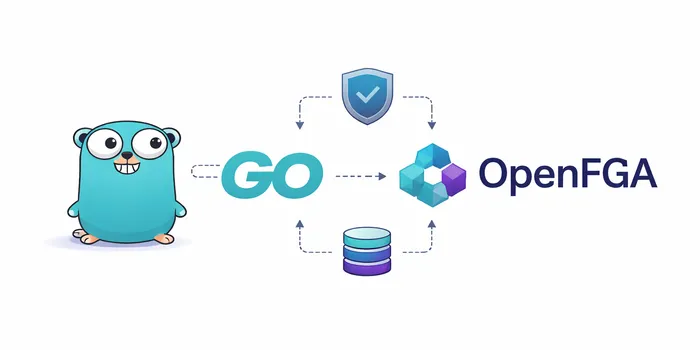
In this article, I demonstrate fine-grained authorization in Go using OpenFGA by building a secure file access management system. The system stores user and authorization data in PostgreSQL, while the actual files are stored in MongoDB.
Authentication vs Authorization
Authentication (authN) is the process of verifying a user’s identity. The main question it answers is “who are you?”. Authorization (authZ) determines what actions a user is allowed to perform. The main question it answers is “Can this user perform this action on this resource?”. A user must be authenticated before their access can be evaluated.
Authentication can be achieved using methods like passwords, biometrics, 2FA/MFA, OTPs, JWT or cookie verification. Authorization can be achieved using models like ABAC, RBAC, and ReBAC, with attributes, permissions, roles, relationships, and scopes as enforcement mechanisms.
Fine-grained Authorization (FGA): This involves making access decisions on a granular level usually for each context, individual file, action, specific data fields, user-resource relationships, etc. FGA enforces principle of least privilege and allows access only for what is necessary unlike in RBAC which is quite broad (“all users” or “all admins”). FGA can be implemented using authorization engines like SpiceDB, Ory Keto, and OpenFGA.
OpenFGA
OpenFGA is an open source authorization/permission engine inspired by Google Zanzibar. It models permissions as relationship between “subjects” and “objects” (e.g., user:bob is owner of document:123). The authorization logic runs as a standalone service which can be used to define permissions and verify access to resources.
OpenFGA has different SDKs to support Java, .NET, Node.js, Go and Python implementations. It supports PostgreSQL, MySQL or SQLite as the production datastore and also in-memory datastore for non-production usage. You can read more about OpenFGA in their official page here.
Using OpenFGA for Authorization in Go
This is a basic implementation where users can sign up and log in with a username and password. They can upload files, and each user should only have access to the files they have uploaded. MongoDB is used to store the files, while PostgreSQL stores both the users table and the authorization data managed by OpenFGA.
I’m using Docker to manage the setup of both PostgreSQL and OpenFGA for simplicity. This implementation focuses primarily on OpenFGA. The article assumes you are familiar with setting up a basic Go API server and have experience with Docker, PostgreSQL, MongoDB, JWT, and user authentication, so it does not cover those implementation details.
The folders and files are laid out as described in the structure below. The file cmd/api/main.go is the entry point to the application, you can find helper functions in the internal/utils/helpers.go file. The pkg folder contains the authorization authz, db, handler, middleware and server packages. docker-composer.yml contains our docker configurations and the .env file contains our environment variables.
Folder Structure
go-openfga-implementation/
├─ cmd/
│   └─ api/
│       └─ main.go
│
├─ internal/
│   └─ utils/
│       └─ helpers.go
│
├─ pkg/
│   ├─ authz/
│   │   └─ authz.go
│   ├─ db/
│   │   ├─ mongo.go
│   │   └─ postgres.go
│   ├─ handler/
│   │   ├─ auth.go
│   │   ├─ handler.go
│   │   └─ media.go
│   ├─ middleware/
│   │   └─ auth.go
│   └─ server/
│       └─ server.go
│
├─ docker-compose.yml
├─ go.mod
├─ go.sum
└─ .env
Setting up OpenFGA and Postgres
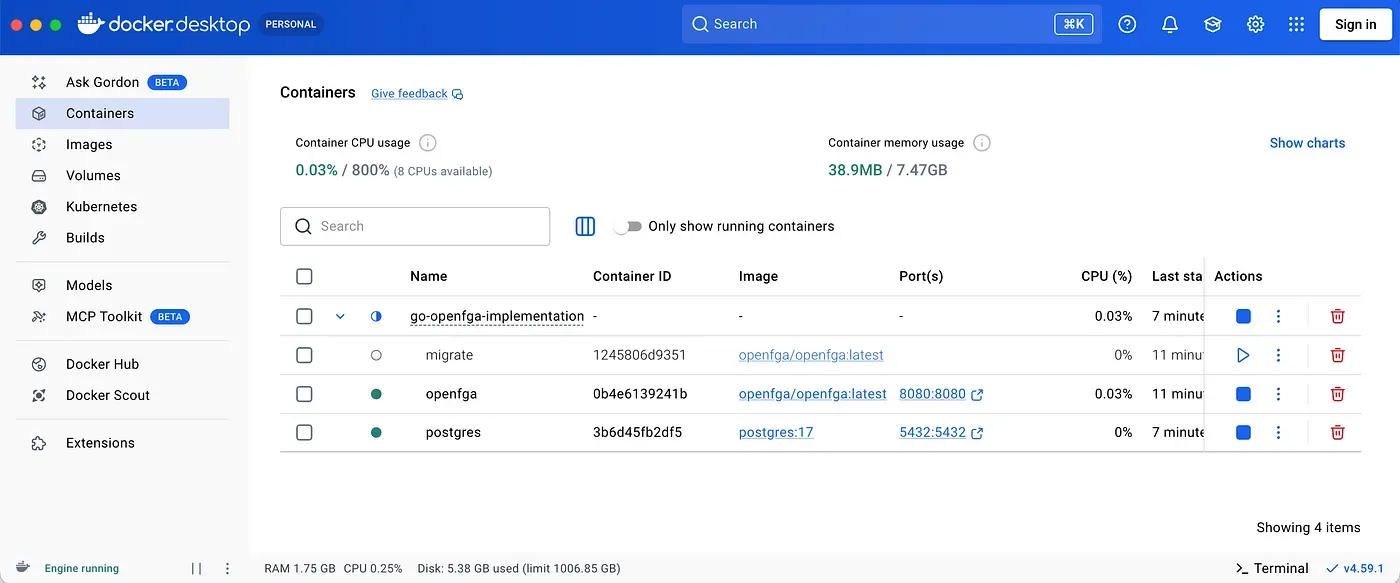
Set up docker containers using the configurations below in the docker-compose.yml file. This configuration includes a PostgreSQL database for storing user and authorization data, a one-time migration container to initialize the OpenFGA schema and start the OpenFGA API server. The setup ensures services start in the correct order and that OpenFGA only runs after the database is ready and fully migrated.
# docker-compose.yml

version: '3.8'

networks:
  openfga:

services:
  postgres:
    image: postgres:17
    container_name: postgres
    ports:
      - '5432:5432'
    networks:
      - openfga
    environment:
      POSTGRES_USER: postgres
      POSTGRES_PASSWORD: password
      POSTGRES_DB: go_openfga_db
    healthcheck:
      test: ['CMD-SHELL', 'pg_isready -U postgres']
      interval: 5s
      timeout: 5s
      retries: 5
    volumes:
      - postgres_data:/var/lib/postgresql/data

  migrate:
    depends_on:
      postgres:
        condition: service_healthy
    image: openfga/openfga:latest
    container_name: migrate
    command: migrate
    environment:
      - OPENFGA_DATASTORE_ENGINE=postgres
      - OPENFGA_DATASTORE_URI=postgres://postgres:password@postgres:5432/go_openfga_db?sslmode=disable
    networks:
      - openfga

  openfga:
    depends_on:
      migrate:
        condition: service_completed_successfully
    image: openfga/openfga:latest
    container_name: openfga
    environment:
      - OPENFGA_DATASTORE_ENGINE=postgres
      - OPENFGA_DATASTORE_URI=postgres://postgres:password@postgres:5432/go_openfga_db?sslmode=disable
      - OPENFGA_LOG_FORMAT=json
    command: run
    ports:
      - '8080:8080'
    networks:
      - openfga

volumes:
  postgres_data:
Ensure you have docker installed and running. Navigate to the folder with your docker-compose.yml file and run the command docker compose up -d to spin up the containers. You can also run docker logs -f openfga to view openfga logs.
Generating Store ID and Setting the Authorization Model
Once the containers are running, the OpenFGA API will be available at http://localhost:8080. First, generate your store ID using the command below. You should receive a response containing the store ID. Use this value as YOUR_STORE_ID in the second command to create the authorization model, this will return an authorization model ID. Update the environment variable with this values. If you encounter any issues with curl, you can use Postman or another HTTP client to send the requests.
curl -X POST http://localhost:8080/stores \
  -H "Content-Type: application/json" \
  -d '{"name":"files-store"}'
curl -X POST http://localhost:8080/stores/YOUR_STORE_ID/authorization-models \
-H "Content-Type: application/json" \
-d '{
"schema_version": "1.1",
"type_definitions": [
{ "type": "user" },
{
"type": "file",
"relations": {
"owner": { "this": {} },
"viewer": { "computedUserset": { "relation": "owner" } }
},
"metadata": {
"relations": {
"owner": { "directly_related_user_types": [{ "type": "user" }] }
}
}
}
]
}'Mongo DB and Go API setup
Setup your Mongo database, you can use a local DB instance in this case. You can find the content of other files below.
.env contains your environment variables. Update with your own settings.
#.env file

POSTGRES_URL=postgres://postgres:password@localhost:5432/go_openfga_db?sslmode=disable
PORT=8000
JWT_SECRET=supersecretjwt
MONGO_URI=mongodb://localhost:27017
MONGO_DB=uploads
FGA_URL=http://localhost:8080
FGA_STORE_ID=01KGD1488381MNMCA7MARBB9JF
FGA_AUTH_MODEL_ID=01KGDJY9GM226NSTE7814EC6QN
cmd/api/main.go is the main module and the entry point of the application.
// cmd/api/main.go

package main

import (
 "log"

 "github.com/go-chi/chi/v5"
 "github.com/manaraph/go-openfga-implementation/internal/utils"
 "github.com/manaraph/go-openfga-implementation/pkg/handler"
 "github.com/manaraph/go-openfga-implementation/pkg/server"
)

func main() {
 config, err := utils.InitializeAppConfig()
 if err != nil {
  log.Fatal("failed to initialize FGA client:", err)
 }

 r := chi.NewRouter()
 h := handler.New(config.DB, config.MongoDB, config.FGA)
 h.RegisterRoutes(r)

 srv := server.New(":"+config.Port, r)
 if err := srv.Start(); err != nil {
  log.Fatal(err)
 }
internals/utils/helpers.go contains helper functions.
// internals/utils/helpers.go

package utils

import (
 "context"
 "errors"
 "log"
 "os"
 "strconv"

 "github.com/jmoiron/sqlx"
 "github.com/joho/godotenv"
 "github.com/manaraph/go-openfga-implementation/pkg/authz"
 "github.com/manaraph/go-openfga-implementation/pkg/db"
 "github.com/manaraph/go-openfga-implementation/pkg/middleware"
 "github.com/openfga/go-sdk/client"
 "go.mongodb.org/mongo-driver/mongo"
)

type AppConfig struct {
 Port        string
 DB          *sqlx.DB
 MongoDB     *mongo.Database
 MongoClient *mongo.Client
 FGA         *client.OpenFgaClient
}

func UserIDFromContext(ctx context.Context) (string, bool) {
 userID, ok := ctx.Value(middleware.UserIdKey).(int)
 return strconv.Itoa(userID), ok
}

func InitializeAppConfig() (*AppConfig, error) {
 if err := godotenv.Load(); err != nil {
  return nil, errors.New("No .env file found, reading from env vars")
 }

 port := os.Getenv("PORT")
 if port == "" {
  return nil, errors.New("PORT is required")
 }

 url := os.Getenv("POSTGRES_URL")
 if url == "" {
  return nil, errors.New("POSTGRES_URL is required")
 }

 mongoURI := os.Getenv("MONGO_URI")
 if mongoURI == "" {
  return nil, errors.New("MONGO_URI is required")
 }

 mongoDBName := os.Getenv("MONGO_DB")
 if mongoDBName == "" {
  mongoDBName = "files_db"
 }

 fgaUrl := os.Getenv("FGA_URL")
 if fgaUrl == "" {
  return nil, errors.New("FGA_URL is required")
 }

 fgaStoreId := os.Getenv("FGA_STORE_ID")
 if fgaStoreId == "" {
  return nil, errors.New("FGA_STORE_ID is required")
 }

 fgaAuthId := os.Getenv("FGA_AUTH_MODEL_ID")
 if fgaStoreId == "" {
  log.Fatal("FGA_AUTH_MODEL_ID is required")
  return nil, errors.New("FGA_AUTH_MODEL_ID is required")
 }

 // Connect to Postgres DB
 pg, err := db.ConnectPostgres(url)
 if err != nil {
  log.Fatal(err)
  return nil, err
 }

 // Connect to MongoDB
 mg, err := db.ConnectMongo(mongoURI, mongoDBName)
 if err != nil {
  log.Fatal("failed to connect to mongo:", err)
  return nil, err
 }

 // Initialize OpenFGA client
 fga, err := authz.NewFGAClient(fgaUrl, fgaStoreId, fgaAuthId)
 if err != nil {
  log.Fatal("failed to initialize FGA client:", err)
  return nil, err
 }

 return &AppConfig{
  Port:        port,
  DB:          pg.DB,
  MongoDB:     mg.DB,
  MongoClient: mg.Client,
  FGA:         fga,
 }, nil
}
pkg/authz/authz.go contains the NewFGAClient function and is used to initialize a new FGA client. The function accepts three parameters, the apiUrl (OpenFGA API url), storeId (generated earlier) and authModelId (the authorization model Id). This is used to create a new client using the SDK client.
// pkg/authz/authz.go

package authz

import "github.com/openfga/go-sdk/client"

func NewFGAClient(apiUrl string, storeId string, authModelId string) (*client.OpenFgaClient, error) {
 cfg := client.ClientConfiguration{
  ApiUrl:               apiUrl,
  StoreId:              storeId,
  AuthorizationModelId: authModelId,
 }

 fga, err := client.NewSdkClient(&cfg)
 if err != nil {
  return nil, err
 }

 return fga, nil
}
pkg/db/mongo.go contains the code for setting up a new MongoDB client connection.
// pkg/db/mongo.go

package db

import (
 "context"
 "time"

 "go.mongodb.org/mongo-driver/mongo"
 "go.mongodb.org/mongo-driver/mongo/options"
)

type Mongo struct {
 Client *mongo.Client
 DB     *mongo.Database
}

func ConnectMongo(uri, dbName string) (*Mongo, error) {
 ctx, cancel := context.WithTimeout(context.Background(), 10*time.Second)
 defer cancel()

 client, err := mongo.Connect(ctx, options.Client().ApplyURI(uri))
 if err != nil {
  return nil, err
 }

 if err := client.Ping(ctx, nil); err != nil {
  return nil, err
 }

 return &Mongo{
  Client: client,
  DB:     client.Database(dbName),
 }, nil
}
pkg/db/postgres.go sets up a PostgreSQL database connection for the Go API. In this setup, the users table is automatically created if it does not already exist. This table is used to register user accounts for authentication.
// pkg/db/postgres.go

package db

import (
 "log"

 "github.com/jmoiron/sqlx"
 _ "github.com/lib/pq"
)

type Postgres struct {
 DB *sqlx.DB
}

func ConnectPostgres(dsn string) (*Postgres, error) {
 db, err := sqlx.Connect("postgres", dsn)
 if err != nil {
  return nil, err
 }

 if err := createSchema(db); err != nil {
  return nil, err
 }

 return &Postgres{DB: db}, nil
}

func createSchema(db *sqlx.DB) error {
 schema := `
 CREATE TABLE IF NOT EXISTS users (
  id SERIAL PRIMARY KEY,
  username TEXT UNIQUE NOT NULL,
  password TEXT NOT NULL,
  created_at TIMESTAMPTZ DEFAULT NOW(),
  updated_at TIMESTAMPTZ DEFAULT NOW()
 );
 `

 _, err := db.Exec(schema)
 if err != nil {
  log.Println("failed to create users table:", err)
  return err
 }

 return nil
}
pkg/server/server.go contains the code to set up the Go HTTP server.
// pkg/server/server.go

package server

import (
 "log"
 "net/http"
 "time"

 "github.com/go-chi/chi/v5"
)

type Server struct {
 httpServer *http.Server
}

func New(addr string, router chi.Router) *Server {
 return &Server{
  httpServer: &http.Server{
   Addr:         addr,
   Handler:      router,
   ReadTimeout:  10 * time.Second,
   WriteTimeout: 10 * time.Second,
  },
 }
}

func (s *Server) Start() error {
 log.Println("HTTP server listening on", s.httpServer.Addr)
 return s.httpServer.ListenAndServe()
}

func (s *Server) Shutdown() error {
 log.Println("Shutting down server")
 return s.httpServer.Close()
}
pkg/middleware/auth.go contains the authentication middleware, which verifies the user’s token and adds the userID to the request context for use in handlers.
// pkg/middleware/auth.go

package middleware

import (
 "context"
 "net/http"
 "strings"

 "github.com/golang-jwt/jwt/v5"
)

const UserIdKey string = "user_id"

func AuthMiddleware(jwtSecret []byte) func(http.Handler) http.Handler {
 return func(next http.Handler) http.Handler {
  return http.HandlerFunc(func(w http.ResponseWriter, r *http.Request) {
   auth := r.Header.Get("Authorization")
   if auth == "" {
    http.Error(w, "missing authorization header", http.StatusUnauthorized)
    return
   }

   parts := strings.Split(auth, " ")
   if len(parts) != 2 || parts[0] != "Bearer" {
    http.Error(w, "invalid authorization header", http.StatusUnauthorized)
    return
   }

   token, err := jwt.Parse(parts[1], func(t *jwt.Token) (any, error) {
    return jwtSecret, nil
   })
   if err != nil || !token.Valid {
    http.Error(w, "invalid token", http.StatusUnauthorized)
    return
   }

   claims := token.Claims.(jwt.MapClaims)
   userID := int(claims["user_id"].(float64))

   ctx := context.WithValue(r.Context(), UserIdKey, userID)
   next.ServeHTTP(w, r.WithContext(ctx))
  })
 }
}
pkg/handler/handler.go contains the logic for registering API routes. It includes a New constructor function that creates a new Handler instance and injects its dependencies. This allows the handler to check permissions using handler.FGA, query PostgreSQL with handler.DB, and access MongoDB with handler.MongoDB. All routes beginning with /files require authentication and use the authMiddleware.
// pkg/handler/handler.go

package handler

import (
 "encoding/json"
 "net/http"
 "os"

 "github.com/go-chi/chi/v5"
 "github.com/jmoiron/sqlx"
 "github.com/manaraph/go-openfga-implementation/pkg/middleware"
 "github.com/openfga/go-sdk/client"
 "go.mongodb.org/mongo-driver/mongo"
)

type Handler struct {
 DB      *sqlx.DB
 MongoDB *mongo.Database
 FGA     *client.OpenFgaClient
}

func New(db *sqlx.DB, mongo *mongo.Database, fga *client.OpenFgaClient) *Handler {
 return &Handler{
  DB:      db,
  MongoDB: mongo,
  FGA:     fga,
 }
}

func (h *Handler) RegisterRoutes(r chi.Router) {
 r.Get("/health", h.health)

 auth := NewAuth(h.DB)
 r.Post("/signup", auth.Signup)
 r.Post("/login", auth.Login)

 authMiddleware := middleware.AuthMiddleware([]byte(os.Getenv("JWT_SECRET")))

 r.Route("/files", func(r chi.Router) {
  r.Use(authMiddleware)
  media := NewFileHandler(h.MongoDB, h.FGA)
  r.Post("/upload", media.Upload)
  r.Get("/", media.GetFiles)
  r.Get("/{id}", media.DownloadFile)
 })
}

func apiResponse(w http.ResponseWriter, status int, payload any) {
 w.Header().Set("Content-Type", "application/json")
 w.WriteHeader(status)
 json.NewEncoder(w).Encode(payload)
}

func (h *Handler) health(w http.ResponseWriter, r *http.Request) {
 apiResponse(w, http.StatusOK, map[string]string{
  "status":  "ok",
  "message": "API Working",
 })
}
pkg/handler/auth.go handles the authentication routes (/signup and /login). Both routes use the POST method with a payload containing a username and password. Upon logging in, the user receives a token, which is then used to access protected routes.
// pkg/handler/auth.go

package handler

import (
 "encoding/json"
 "net/http"
 "os"
 "time"

 "github.com/golang-jwt/jwt/v5"
 "github.com/jmoiron/sqlx"
 "github.com/labstack/gommon/log"
 "golang.org/x/crypto/bcrypt"
)

type AuthHandler struct {
 DB *sqlx.DB
}

type authRequest struct {
 Username string `json:"username"`
 Password string `json:"password"`
}

func NewAuth(db *sqlx.DB) *AuthHandler {
 return &AuthHandler{
  DB: db,
 }
}

// POST /signup
func (h *AuthHandler) Signup(w http.ResponseWriter, r *http.Request) {
 var req authRequest
 log.Infof("request: %v", r)
 if err := json.NewDecoder(r.Body).Decode(&req); err != nil {
  apiResponse(w, http.StatusBadRequest, map[string]string{
   "message": "invalid request: " + err.Error(),
  })

  return
 }

 hashed, err := bcrypt.GenerateFromPassword([]byte(req.Password), bcrypt.DefaultCost)
 if err != nil {
  apiResponse(w, http.StatusInternalServerError, map[string]string{
   "message": "error hashing password: " + err.Error(),
  })
  return
 }

 _, err = h.DB.Exec("INSERT INTO users (username, password) VALUES ($1, $2)", req.Username, string(hashed))
 if err != nil {
  apiResponse(w, http.StatusBadRequest, map[string]string{
   "message": "user creation failed: " + err.Error(),
  })
  return
 }

 apiResponse(w, http.StatusCreated, map[string]string{
  "message": "user created",
 })
}

// POST /login
func (h *AuthHandler) Login(w http.ResponseWriter, r *http.Request) {
 var req authRequest
 if err := json.NewDecoder(r.Body).Decode(&req); err != nil {
  apiResponse(w, http.StatusBadRequest, map[string]string{
   "message": "invalid request: " + err.Error(),
  })
  return
 }

 var userId int
 var hashed string
 err := h.DB.QueryRow("SELECT id, password FROM users WHERE username=$1", req.Username).Scan(&userId, &hashed)
 if err != nil {
  apiResponse(w, http.StatusUnauthorized, map[string]string{
   "message": "invalid credentials: " + err.Error(),
  })
  return
 }

 if err = bcrypt.CompareHashAndPassword([]byte(hashed), []byte(req.Password)); err != nil {
  apiResponse(w, http.StatusUnauthorized, map[string]string{
   "message": "invalid credentials: " + err.Error(),
  })
  return
 }

 token := jwt.NewWithClaims(jwt.SigningMethodHS256, jwt.MapClaims{
  "user_id":  userId,
  "username": req.Username,
  "exp":      time.Now().Add(time.Hour * 3).Unix(),
 })

 secret := os.Getenv("JWT_SECRET")
 t, err := token.SignedString([]byte(secret))
 if err != nil {
  apiResponse(w, http.StatusInternalServerError, map[string]string{
   "message": "error signing token: " + err.Error(),
  })
  return
 }

 apiResponse(w, http.StatusOK, map[string]string{
  "message": "success",
  "token":   t,
 })
}
pkg/handler/media.go contains the logic for file upload and retrieval.
// pkg/handler/media.go

package handler

import (
 "context"
 "io"
 "net/http"
 "time"

 "github.com/go-chi/chi/v5"
 "github.com/manaraph/go-openfga-implementation/internal/utils"
 "github.com/openfga/go-sdk/client"
 "go.mongodb.org/mongo-driver/bson"
 "go.mongodb.org/mongo-driver/bson/primitive"
 "go.mongodb.org/mongo-driver/mongo"
 "go.mongodb.org/mongo-driver/mongo/gridfs"
)

type FileHandler struct {
 DB  *mongo.Database
 FGA *client.OpenFgaClient
}

func NewFileHandler(db *mongo.Database, fga *client.OpenFgaClient) *FileHandler {
 return &FileHandler{
  DB:  db,
  FGA: fga,
 }
}

// POST /files/upload
func (h *FileHandler) Upload(w http.ResponseWriter, r *http.Request) {
 ctx, cancel := context.WithTimeout(r.Context(), 30*time.Second)
 defer cancel()

 userID, ok := utils.UserIDFromContext(ctx)
 if !ok {
  http.Error(w, "unauthorized", http.StatusUnauthorized)
  return
 }

 const maxSize = 10 << 20
 r.Body = http.MaxBytesReader(w, r.Body, maxSize)

 if err := r.ParseMultipartForm(maxSize); err != nil {
  apiResponse(w, http.StatusBadRequest, map[string]string{
   "message": "file too large: " + err.Error(),
  })
  return
 }

 file, header, err := r.FormFile("file")
 if err != nil {
  apiResponse(w, http.StatusBadRequest, map[string]string{
   "message": "file is required",
  })
  return
 }
 defer file.Close()

 bucket, err := gridfs.NewBucket(h.DB)
 if err != nil {
  apiResponse(w, http.StatusInternalServerError, map[string]string{
   "message": "failed to create bucket",
  })
  return
 }

 uploadStream, err := bucket.OpenUploadStream(header.Filename)
 if err != nil {
  apiResponse(w, http.StatusInternalServerError, map[string]string{
   "message": "failed to open upload stream",
  })
  return
 }
 defer uploadStream.Close()

 _, err = io.Copy(uploadStream, file)
 if err != nil {
  apiResponse(w, http.StatusInternalServerError, map[string]string{
   "message": "failed to save file",
  })
  return
 }

 fileID := uploadStream.FileID.(primitive.ObjectID).Hex()
 body := client.ClientWriteRequest{
  Writes: []client.ClientTupleKey{
   {
    User:     "user:" + userID,
    Relation: "owner",
    Object:   "file:" + fileID,
   },
  },
 }
 _, err = h.FGA.Write(ctx).Body(body).Execute()
 if err != nil {
  http.Error(w, "failed to write auth relationship", http.StatusInternalServerError)
  return
 }

 apiResponse(w, http.StatusCreated, map[string]any{
  "file_id":  fileID,
  "filename": header.Filename,
 })
}

// GET /files
func (h *FileHandler) GetFiles(w http.ResponseWriter, r *http.Request) {
 ctx := r.Context()
 userID, ok := utils.UserIDFromContext(ctx)
 if !ok {
  http.Error(w, "unauthorized", http.StatusUnauthorized)
  return
 }

 listRequest := client.ClientListObjectsRequest{
  User:     "user:" + userID,
  Relation: "viewer",
  Type:     "file",
 }

 fgaResp, err := h.FGA.ListObjects(ctx).Body(listRequest).Execute()
 if err != nil {
  http.Error(w, "failed to fetch permissions", http.StatusInternalServerError)
  return
 }

 var fileOIDs []primitive.ObjectID
 for _, obj := range fgaResp.GetObjects() {
  // Strip the "file:" prefix
  idStr := obj[len("file:"):]
  oid, err := primitive.ObjectIDFromHex(idStr)
  if err == nil {
   fileOIDs = append(fileOIDs, oid)
  }
 }

 if len(fileOIDs) == 0 {
  apiResponse(w, http.StatusOK, map[string]any{"data": []any{}})
  return
 }

 cursor, err := h.DB.Collection("fs.files").Find(ctx, bson.M{
  "_id": bson.M{"$in": fileOIDs},
 })
 if err != nil {
  http.Error(w, "failed to fetch files from db", http.StatusInternalServerError)
  return
 }
 defer cursor.Close(ctx)

 var files []map[string]any
 if err := cursor.All(ctx, &files); err != nil {
  http.Error(w, "failed to decode files", http.StatusInternalServerError)
  return
 }

 apiResponse(w, http.StatusOK, map[string]any{
  "data": files,
 })
}

// GET /files/{id}
func (h *FileHandler) DownloadFile(w http.ResponseWriter, r *http.Request) {
 ctx := r.Context()
 id := chi.URLParam(r, "id")

 userID, ok := utils.UserIDFromContext(ctx)
 if !ok {
  http.Error(w, "unauthorized", http.StatusUnauthorized)
  return
 }

 body := client.ClientCheckRequest{
  User:     "user:" + userID,
  Relation: "owner",
  Object:   "file:" + id,
 }

 check, err := h.FGA.Check(ctx).Body(body).Execute()
 if err != nil {
  http.Error(w, "authorization error", http.StatusInternalServerError)
  return
 }

 if check.Allowed == nil || !*check.Allowed {
  http.Error(w, "forbidden", http.StatusForbidden)
  return
 }

 oid, err := primitive.ObjectIDFromHex(id)
 if err != nil {
  http.Error(w, "invalid file id", http.StatusBadRequest)
  return
 }

 bucket, _ := gridfs.NewBucket(h.DB)
 stream, err := bucket.OpenDownloadStream(oid)
 if err != nil {
  http.Error(w, "file not found", http.StatusNotFound)
  return
 }
 defer stream.Close()

 w.Header().Set("Content-Type", "application/octet-stream")
 io.Copy(w, stream)
}
Summary
The code above demonstrates a basic implementation of fine-grained authorization in Go using OpenFGA. It assumes that authentication has already been performed by the middleware. During authentication, the middleware extracts the user identity and stores it in the request context. The authorization logic then retrieves the user ID from the context and uses OpenFGA to evaluate whether the user is allowed to perform the requested action. The authorization process can be summarized as follows:
- Run PostgreSQL and OpenFGA locally using Docker Compose.
- Create an OpenFGA store and define an authorization model that describes relationships such as owner and viewer.
- Initialize the OpenFGA SDK client with the required configuration.
- Write relationship tuples when a file is uploaded to record how users are related to the file.
- Perform a permission check with OpenFGA based on those relationships before allowing access.
// Initializing the OpenFGA SDK client.
cfg := client.ClientConfiguration{
  ApiUrl:               "http://localhost:8080",
  StoreId:              "01KGD1488381MNMCA7MARBB9JF",
  AuthorizationModelId: "01KGDJY9GM226NSTE7814EC6QN",
 }
 fga, err := client.NewSdkClient(&cfg)


// Sample authentication check from the code
 ctx := r.Context()
 userID, ok := utils.UserIDFromContext(ctx)
 if !ok {
  http.Error(w, "unauthorized", http.StatusUnauthorized)
  return
 }


// Sample relationship write request from the code
body := client.ClientWriteRequest{
  Writes: []client.ClientTupleKey{
   {
    User:     "user:" + userID,
    Relation: "owner",
    Object:   "file:" + fileID,
   },
  },
 }
 _, err = h.FGA.Write(ctx).Body(body).Execute()


// Sample relationship check request from the code
body := client.ClientCheckRequest{
  User:     "user:" + userID,
  Relation: "owner",
  Object:   "file:" + id,
 }
 check, err := h.FGA.Check(ctx).Body(body).Execute()


// Sample request to list all files where a user has a viewer relationship
listRequest := client.ClientListObjectsRequest{
  User:     "user:" + userID,
  Relation: "viewer",
  Type:     "file",
 }
 fgaResp, err := h.FGA.ListObjects(ctx).Body(listRequest).Execute()
Conclusion
One interesting aspect of using OpenFGA is that it runs as a standalone service, allowing the authorization model to be updated dynamically without redeploying the application. For security, OpenFGA should be deployed on a private network, with access limited to backend services and administrators, while keeping it isolated from end users.
OpenFGA makes it easier to manage fine-grained, relationship-based permissions like owner, editor, or viewer, and to handle permission checks across multiple services. While SpiceDB has more advanced features for very large permission graphs, and Ory Keto is part of a larger identity management system, OpenFGA provides a simple, developer-friendly SDK with scalable permission evaluation, making it a practical choice for multi-service applications with centralized, dynamic authorization.
The complete working code, including examples for sharing and revoking file access, is available on my GitHub repository here.