Engineering
Fine-Grained Authorization: Building Precise and Scalable Access Control

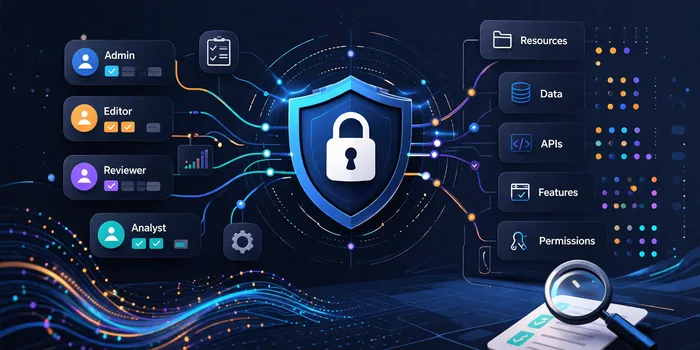
When you think about security in most digital products, you realize it is often a switch between administrators and other roles. There are "admins" who can do everything and "users" who can do a few things. This is known as coarse-grained authorization, where users are granted access using role-based access control (RBAC) checks like "isAdmin" or "isUser".
As an application grows, simple role checks quickly become inefficient with various user expectations. For example when a customer makes a request like: "I want my staff to view and edit this document, but only until Friday?". This level of detail cannot be handled by a standard role check without creating a mess. Hence the need for fine-grained authorization.
Let’s clear up a common point of confusion between authentication and authorization before discussing granular control.
Authentication vs Authorization
Imagine an office complex with multiple businesses, this building is secured and only allows access to staff of the companies within the building. Every staff member has an access card that they can use to enter the building. When a staff member swipes their card, the security system checks the identity of the staff and opens the door. This is authentication (the process of verifying the identity of a user or system). It checks who the user is and determines if the user can enter the building.
Once the staff enters the building they can only enter offices owned by the company for which they are employed. In addition to this, not all staff members have access to certain rooms like the server/IT room, even though they are owned by their company. Only certain members of the IT team have permission to access this room. This is authorization (it determines what the user is allowed to do within the system or what part of the building a user can access in this case).
Authentication is basically the first step before authorization (you need to enter the office complex before you can access an office). The fact that a user is authenticated does not mean they have the permission to do certain things (access to the office complex does not mean you could enter offices belonging to other companies). Only when authorization is successful before the next step (access to the office or room) is guaranteed.
What Does Fine-Grained Authorization Mean?
Fine-grained authorization (FGA) is an access control approach where permissions are evaluated at a detailed level (It is about being very specific with permissions). Instead of assigning roles with permissions that applies to all users with that role (as seen with RBAC), decisions are made dynamically using policies that consider:
- The user (identity, role, attributes).
- The action (read, write, delete, approve).
- The resource (document, project, task).
- The context (time, location, ownership, status).
Instead of checking "Is this person an admin?", you are checking "Can this person edit this item right now?". For example, a user can edit only the tasks they created, a support agent can view but not modify customer data.
Why Does It Matter?
- Improved security: Users only get access to what they need, enforcing the principle of least privilege and reducing the risk of mistake or misuse.
- Better user experience: Users only see and interact with what is relevant to them, reducing confusion and making the application easier to use.
- Scalability: As your system grows, hardcoded role checks become unmanageable. Fine-grained policies scale more effectively across teams, features and services since it is easier to adjust permissions without redesigning everything.
- Compliance and auditing: Some regulations require granular control over who sees sensitive data. FGA provides clear audit logs necessary to prove compliance.
Architecture of FGA
To implement FGA effectively, most systems rely on one of three access control models:
Attribute-Based Access Control (ABAC): Access is dynamically granted to resources based on policies evaluating combined attributes like action, user, resource, context.
For example allow access to "Financial-report" if: user.department == "finance" AND document.sensitivity != "secret"
The Result: The user has access if they are in the finance department and the document is not sensitive.
Relationship-Based Access Control (ReBAC): Access is granted based on a "graph" of relationships between users and specific resources (like files or folders). This model, famously detailed in Google’s "Zanzibar" paper, powers the permission system for Google Drive and YouTube. It is the core architectural foundation for authorization tools like OpenFGA, Warrant, and Auth0 FGA. A typical ReBAC logic is as follows:
Relation 1: User "Alice" is a member of the "Marketing Team"
Relation 2: "Marketing Team" is an editor of "Q2 strategy doc"
The Result: Alice can edit the document "Q2 strategy doc" since she is a member of the marketing team.
Policy-Based Access Control (PBAC): Is a logic-driven approach where centralized policies govern access and often managed by engines like Open Policy Agent (OPA). PBAC is typically implemented using Policy-as-Code (PaC), where the authorization rules are written in specialized language like Rego (for OPA) or Polar (for Oso) and managed like standard software. A common use case is restricting API deployments in cloud environments based on real time operational context. Below is a sample Rego logic:
// Sample Rego pseudo-code logic
allow {
    input.action == "deploy"
    input.user.is_on_oncall_rotation == true
    input.resource.environment != "production"
}
The result: A developer can deploy to “staging” anytime, but can only deploy to “production” if they are currently on call.
| Model | Primary Access Factor | Best For | Example Logic |
|---|---|---|---|
| RBAC (Role-Based Access Control) | User role | Simple systems with clear role hierarchy | allow if user.role == 'admin' |
| ABAC (Attribute-Based Access Control) | Attributes (user, resource, context) | Dynamic, condition-based access control | allow if user.department == resource.department |
| ReBAC (Relationship-Based Access Control) | Relationships (user to resource or group) | Collaboration, sharing, ownership-based access | allow if user is member of resource.project |
| PBAC (Policy-Based Access Control) | Centralized policies | Large systems needing consistent, scalable control | allow if policy.evaluate (user, action, resource) |
Conclusion
Fine-grained authorization optimizes your application access for clarity and control ensuring that people can do what they need to do and cannot do what they shouldn’t. A basic role check might be sufficient initially but as the application grows, fine-grained authorization becomes more of a necessity. Thinking about permissions early in the application development can save you from a lot of trouble later.